> ## Documentation Index
> Fetch the complete documentation index at: https://magicblock-42-dode-check-links.mintlify.site/llms.txt
> Use this file to discover all available pages before exploring further.
# 在 Github Pages 上托管你的游戏
> 使用 Github Pages 免费托管你的游戏
Solana.Unity SDK 与 WebGL 完全兼容。在本教程中,你将编译 Solana.Unity-SDK 的[演示场景](https://garbles-labs.github.io/Solana.Unity-SDK/),并通过 [Github Pages](https://pages.github.com/) 发布它。
借助 GitHub Pages,GitHub 允许你直接从仓库托管网页。
## 将游戏编译为 WebGL
1. 下载并安装 [Unity](https://unity3d.com/get-unity/download)
2. 按照[说明](https://github.com/garbles-labs/Solana.Unity-SDK#installation)安装 Solana.Unity-SDK,并导入示例
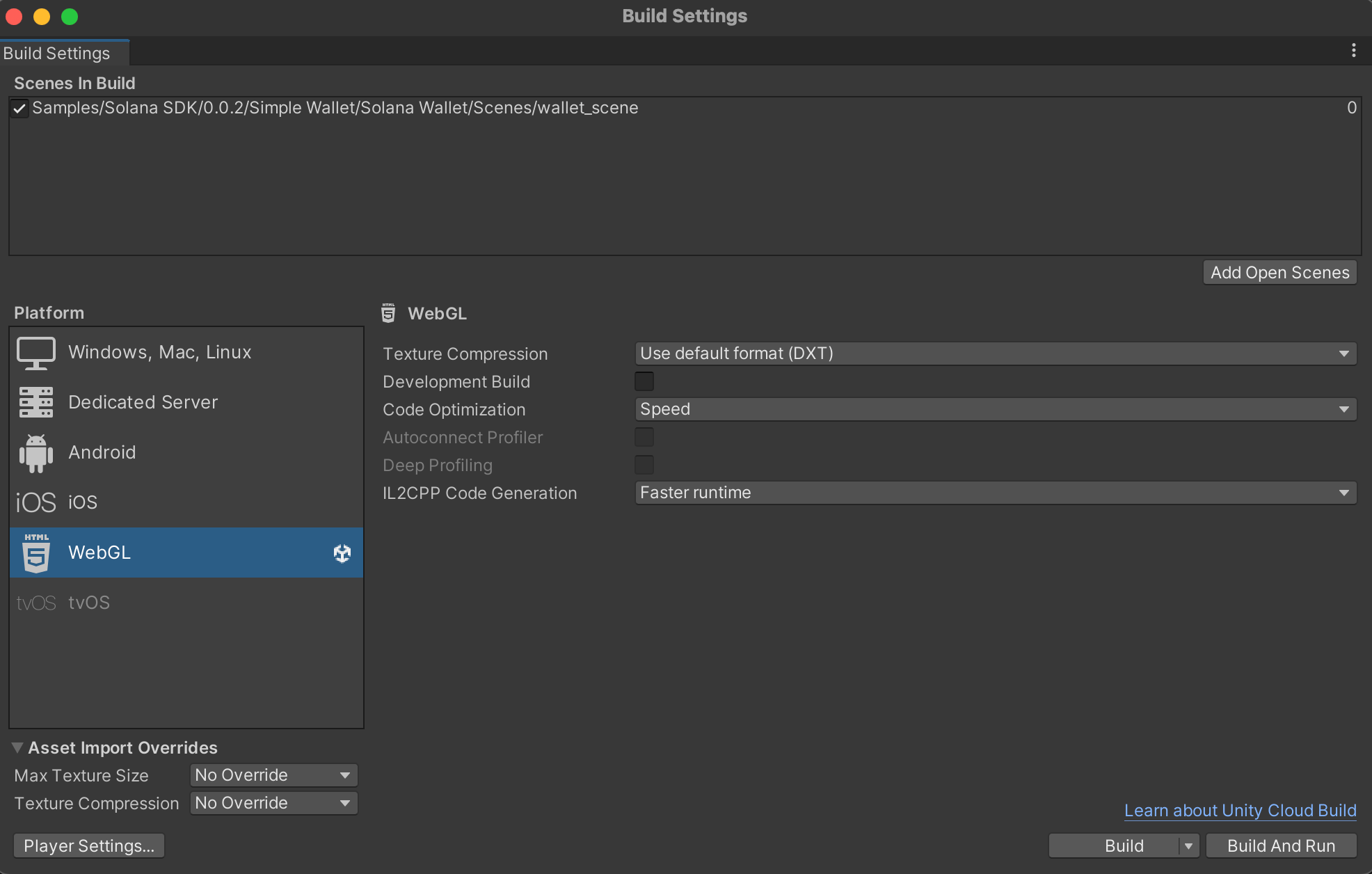
3. 将场景编译为 WebGL(请务必[禁用压缩](https://www.youtube.com/watch?v=2jjESP58jsA),因为 GH Pages 不支持托管压缩文件)
 如果你想跳过编译步骤,可以 fork SDK 仓库,
其中的
[gp-pages](https://github.com/garbles-labs/Solana.Unity-SDK/tree/gh-pages)
分支已经包含预编译的 WebGL 构建
## 在 Github Pages 上托管演示
* 创建一个新仓库
* 进入包含 `index.html` 的构建文件夹
```shell theme={null}
git init
git add .
git commit -m "WebGL game"
git remote add origin
git push origin
```
* 你的仓库现在应与 SDK 的 [gp-pages](https://github.com/garbles-labs/Solana.Unity-SDK/tree/gh-pages) 分支类似
* 在仓库设置中启用 gh-pages 部署
如果你想跳过编译步骤,可以 fork SDK 仓库,
其中的
[gp-pages](https://github.com/garbles-labs/Solana.Unity-SDK/tree/gh-pages)
分支已经包含预编译的 WebGL 构建
## 在 Github Pages 上托管演示
* 创建一个新仓库
* 进入包含 `index.html` 的构建文件夹
```shell theme={null}
git init
git add .
git commit -m "WebGL game"
git remote add origin
git push origin
```
* 你的仓库现在应与 SDK 的 [gp-pages](https://github.com/garbles-labs/Solana.Unity-SDK/tree/gh-pages) 分支类似
* 在仓库设置中启用 gh-pages 部署
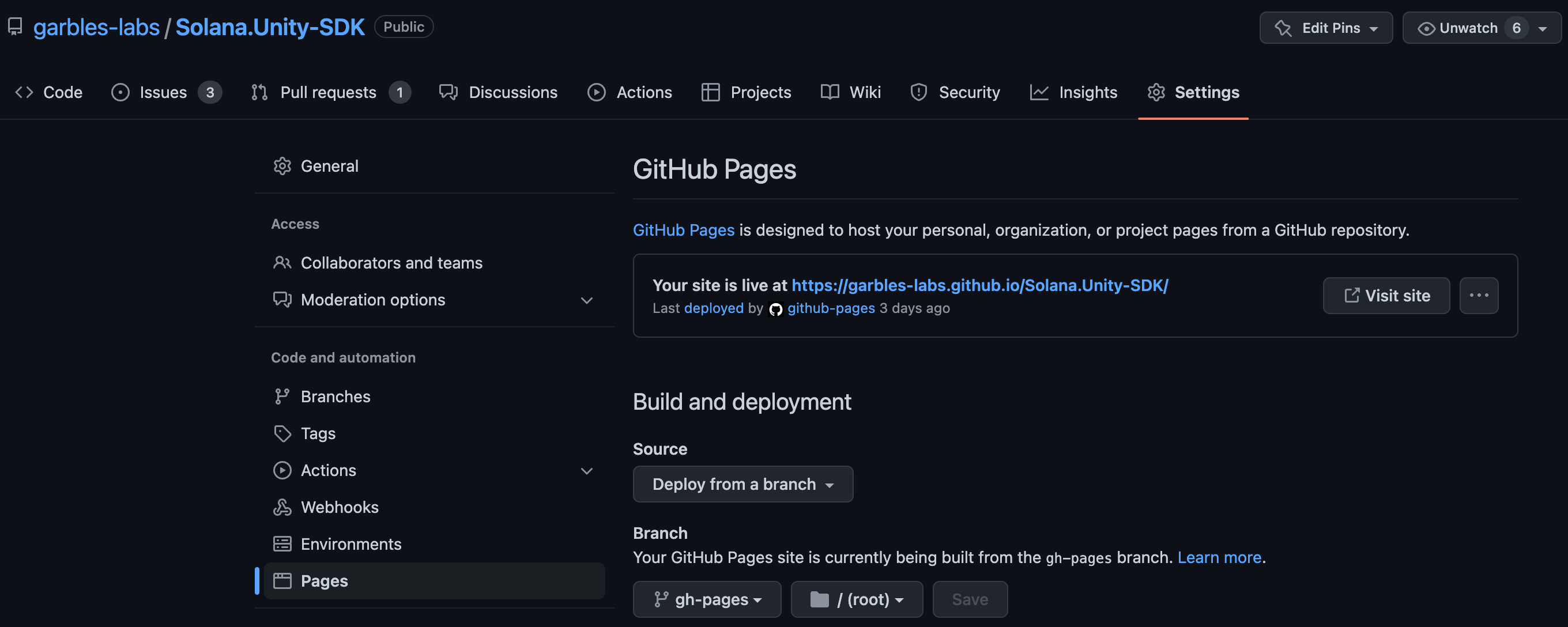 Github 会为线上部署提供一个 URL: [garbles-labs.github.io/Solana.Unity-SDK](https://garbles-labs.github.io/Solana.Unity-SDK/)
了解如何在 Github Pages 上设置[自定义域名](https://docs.github.com/en/pages/configuring-a-custom-domain-for-your-github-pages-site)
按照[此指南](/cn/pages/tools/solana-unity-sdk/guides/publishing-a-game)操作,你可以在不到 2 分钟内将游戏发布为 xNFT。
祝你游戏开发顺利,也别忘了给仓库点个 ⭐
Github 会为线上部署提供一个 URL: [garbles-labs.github.io/Solana.Unity-SDK](https://garbles-labs.github.io/Solana.Unity-SDK/)
了解如何在 Github Pages 上设置[自定义域名](https://docs.github.com/en/pages/configuring-a-custom-domain-for-your-github-pages-site)
按照[此指南](/cn/pages/tools/solana-unity-sdk/guides/publishing-a-game)操作,你可以在不到 2 分钟内将游戏发布为 xNFT。
祝你游戏开发顺利,也别忘了给仓库点个 ⭐